AntiqSnap: Antique Identifier
- 4.7
- Rating
- 1.00M
- Installs
- Free
- Price
 Analysis by App-foxy
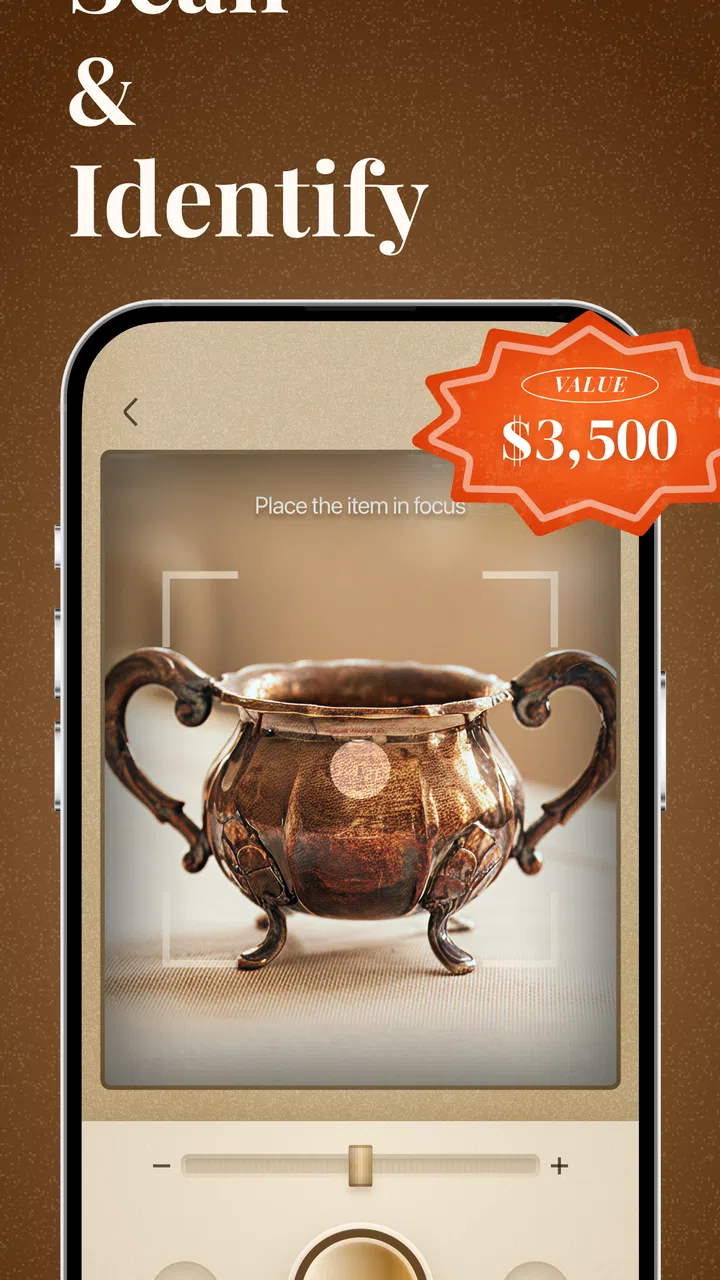
I approached AntiqSnap: Antique Identifier as a practical tool rather than a magic answer to every question about old objects. Its purpose is straightforward: use a phone camera to help identify antiques, get an idea of market value, and keep a collection more organized. In my experience, that combination makes the app most useful during the early stage of research, when I want a quick direction before spending time with specialist references or an appraiser.
The app comes from Next Vision Limited and sits in the tools category. It is free to install, carries an Everyone age rating, and has reached more than a million installs. Its average rating is 4.7 from roughly 62,000 ratings, which suggests that the basic idea is resonating with a large group of users. I would still treat those figures as a sign of popularity, not proof that every identification or valuation will be correct.
How I use it from the first photo to a useful result
The most sensible starting point is a clean, well-lit photograph. I place the object on a plain surface, avoid harsh reflections, and include enough of the item to show its overall shape. A close-up of a mark, maker’s stamp, signature, clasp, or unusual construction detail can be more valuable than a dramatic full-image shot, so I usually think of the process as a small set of photos rather than one rushed picture.
You May Also Like

 Blood Strike: 2.5 Anniversary
Blood Strike’s Loadouts Turn Every Drop Into a Tactical Gamble
A close look at Blood Strike’s custom loadouts: how fast access to signature weapons reshapes its battle royale rhythm, rewards preparation, and narrows the gap between fights.

 Pandora - Music & Podcasts
Pandora’s Music Is Easy to Start, but Harder to Recover
Pandora’s strength is its low-effort path from a seed to a station. Its weak spot is how much confidence it asks you to place in connection, setup, and quiet recovery.

 8 Ball Pool
 Is Built on Rivalries, Rematches, and Routine
A close look at the rivalries, rematches, shared routines, and unanswered safety questions that turn a quick pool match into a persistent mobile community.

 Samsung Music
’s Quiet Strength Is Playing What You Already Own
Its reach comes less from spectacle than from dependable access to a personal library. That simplicity is both the app’s strongest retention engine and its ceiling.

 AccuWeather: Weather Radar
AccuWeather Review: A Quick, Clear Forecast for Everyday Decisions
For everyday plans, the best forecast is the one you can understand quickly. AccuWeather makes rain timing, radar, and local conditions easy to act on, with a few trade-offs.

 Hill Climb Racing
Why Hill Climb Racing Still Turns Crashes Into One More Run
A tiny car, a bumpy hill and one more upgrade: Hill Climb Racing keeps resurfacing because its simple chaos makes every near-miss feel personal.
More From Our News Desk



That habit matters because antiques often look similar at a glance. A vase, piece of furniture, watch, piece of jewelry, or decorative object may need its underside, back, joints, hardware, or markings to separate one possibility from another. AntiqSnap is helpful when I give it visual information that actually carries identification clues. It is less convincing when I point the camera at a dark object surrounded by clutter and expect a precise answer.
After capturing an item, I use the result as a research starting point. The identification can help me decide what terms to search, which details to inspect, and whether the object deserves closer attention. I do not read an estimated market value as a guaranteed selling price. Condition, authenticity, provenance, regional demand, completeness, and the difference between an asking price and a completed sale can all change the real-world value.
A realistic example is finding an inherited brooch in a drawer. I would photograph the front first, then the back and any hallmark or engraving. If the app points me toward a particular style or period, I can compare that direction against the construction and markings. If the result seems too broad, I would not force a conclusion; I would take better detail shots and use the suggested information to continue researching.
The collection side becomes more useful when I stop treating each scan as a one-off curiosity. For a group of inherited objects, I would create a consistent routine: photograph every item in similar lighting, record the identification result, note visible damage, and keep the pieces separated by owner or room. That makes the app more valuable as an organizing aid than as a simple novelty camera.
One practical tip is to photograph condition before cleaning anything. Polishing silver, removing old labels, replacing hardware, or wiping away surface residue can destroy clues and alter the object’s appearance. Even if the app identifies an item more easily after cleaning, the original state may be important to a collector or appraiser. I would preserve the evidence first and make cosmetic decisions later.
Settings and preparation that improve the experience
The most important “setting” is often outside the app: the way the phone camera is prepared. I keep the lens clean, use indirect daylight, and avoid placing reflective metal directly under a bright lamp. For glass, glazed ceramics, and polished wood, moving the phone slightly to one side can reveal details that disappear in a straight-on reflection.
I also check the app’s available options before building a large collection. The current version is 1.1.2, so the layout and controls may change over time, but the principle remains useful: understand where saved items, scan actions, and valuation information appear before photographing dozens of objects. A few minutes spent learning the flow can prevent a messy collection later.
Because AntiqSnap is free to download but includes in-app purchases ranging from $7.99 to $39.99 per item, I would pay attention to what is available without payment before relying on it for a major sorting project. I prefer to test the basic workflow with a few objects first. That makes it easier to decide whether the additional paid functionality is worthwhile for my own collection rather than committing based on curiosity.
The app requires at least iOS or Android equivalent version 10, which is a relatively accessible requirement for many devices. Still, camera quality varies considerably between phones. A modern phone with good close-focus performance will naturally give the recognition process more useful material than an older device with a scratched lens or weak low-light camera.
I would also think carefully about naming and grouping items as I go. A vague label such as “old bowl” may be quick, but it becomes unhelpful once a collection grows. A better personal habit is to include a plain description and a distinguishing feature, such as “blue floral bowl with underside mark.” That kind of naming makes later review faster, especially when several objects resemble one another.
Repeatable habits for faster identification
Experienced use is less about taking one perfect scan and more about repeating a reliable sequence. My preferred order is: full object, important detail, reverse side, condition, then collection note. This prevents the common mistake of identifying an item while forgetting the evidence that supported the result.
For a box of mixed items, I would first separate them by broad type instead of scanning randomly. Jewelry, ceramics, furniture hardware, paper goods, and decorative metalwork often require different visual clues. Sorting first reduces interruptions and helps me compare similar objects side by side. It also makes the final collection easier to browse.
Another useful pattern is to rescan only when the new image answers a specific question. If the first result is uncertain, I might capture the maker’s mark rather than take another identical front photo. If the value estimate seems surprisingly high, I would photograph damage, missing parts, and the item’s full scale. The second scan should add evidence, not merely repeat the first attempt.
I find the app most efficient when I use it during the moment of discovery. At a flea market, estate clear-out, or family home, I can use a quick image to decide whether an object deserves further inspection. That does not replace careful buying judgment, but it can help me notice details I might otherwise overlook. I would still ask about ownership history, inspect construction, and avoid making a purchase solely because a screen suggests a high value.
For insurance or inheritance records, I would use the collection function as one layer of documentation. I would add my own notes about where the item came from, its measurements, visible flaws, and any paperwork. The app can help organize the visual side, but personal records are still important because an automated identification does not capture every fact about ownership or condition.
A less obvious trade-off appears when photographing groups of similar objects. Scanning them all quickly may save time, but it can also encourage accidental mixing of results. I would place one item in the frame at a time and keep its photo sequence together. For a set of matching pieces, I would record whether the item is part of a pair or larger group, since completeness can matter when judging interest and potential value.
Where the estimates help, and where they stop
The app’s market-value feature is useful for setting expectations, especially when I have no idea whether an object is ordinary decoration or something worth researching. It gives me a reason to investigate further and can help prioritize a crowded collection. Its best role is triage: deciding which pieces deserve specialist attention first.
It should not be treated as a formal appraisal. Market value is not a single permanent number, and the same object can perform differently depending on location, timing, venue, condition, authenticity, and presentation. A result may be especially misleading when an item has been repaired, altered, reproduced, or separated from an original set.
I am also cautious with objects that depend heavily on tiny markings. A blurred hallmark can lead the process in the wrong direction, and a decorative imitation may resemble a recognized style. When the financial consequences are meaningful, I would compare the app’s suggestion with reputable reference books, auction archives, specialist forums, or an in-person professional. The app saves time, but it should not carry the entire burden of proof.
Privacy and practicality are worth considering too. Photographing a collection can create a useful visual record, but I would avoid including personal documents, home addresses, or identifying details in the background. Before scanning valuable belongings, I would make sure the camera frame contains only the object and relevant evidence. That is a simple habit, yet it keeps the catalog cleaner and more focused.
There is also a learning curve in interpreting results. Beginners may be tempted to accept the first label that sounds specific. I prefer to look for agreement between the suggested identity and the physical object. Does the material make sense? Is the construction consistent? Do the markings appear genuine and correctly placed? Does the condition support the suggested value? Those questions turn the app from an answer machine into a useful research assistant.
Who should use it and who should choose another route
AntiqSnap is a good fit for casual collectors, families sorting inherited belongings, bargain hunters, and anyone building a visual record of antiques. It is particularly convenient for someone who wants a quick first opinion without learning a full cataloging system before beginning. The free entry point makes experimentation easy, although I would review the in-app purchase choices before starting a large project.
I would recommend it to a friend who regularly encounters unfamiliar objects but does not yet know how to describe them. The app can provide vocabulary and direction, which is often the hardest part of antique research. Once I know whether I am looking at a particular kind of ceramic, metalwork, or decorative style, further research becomes much less overwhelming.
I would not make it my only tool for a high-value sale, legal estate division, formal insurance valuation, or authentication dispute. In those situations, a qualified specialist with access to physical inspection and relevant market experience is the better choice. I would also skip it if I only want a basic inventory with custom fields, detailed export controls, or a long-term archival system; a dedicated collection database may offer more control.
Compared with a general reverse-image search, this app feels more focused on the antique-identification workflow and the connection between recognition, value, and collection organization. A general search engine may expose more scattered references, but it also leaves me to judge which results are relevant. Compared with asking a collector in a social group, AntiqSnap is faster and more private, while a knowledgeable human may notice construction details that a photograph does not communicate well.
The balance is therefore clear. Use the app for speed, sorting, first-pass vocabulary, and deciding what deserves deeper attention. Use specialist sources and human expertise when authenticity, rarity, or money matters. That division of labor gives the app a realistic place in an antique hobby without asking it to do something it cannot reliably do from an image alone.
My verdict after building a repeatable workflow
I like AntiqSnap most when I use it deliberately. A clean photo, a second image of the important mark, an honest condition note, and a sensible collection label produce a much better experience than a single casual snapshot. The app rewards users who supply context through better images and who treat its suggestions as evidence to examine rather than final declarations.
Its strongest everyday use is the first pass through an unknown collection. It can help me separate routine objects from pieces that deserve more research, while the organization tools give those discoveries a place to go. That combination is more useful than identification alone because antique research quickly becomes confusing when photos, notes, and possible values are scattered across a phone.
The limitations are just as important. Image quality, incomplete markings, reproductions, repairs, and changing market conditions can all weaken the result. The presence of paid items means I would test the free experience before spending money, and I would never let an estimate replace a professional opinion for a valuable or disputed object.
For me, the app earns a recommendation as a practical starting point for antique research and collection organization. It is free, approachable, and broad enough for everyday discoveries, with a current version that should work on devices running version 10 or later. If you want quick guidance and are willing to verify important conclusions, AntiqSnap: Antique Identifier is worth trying. If you need formal authentication or a highly customizable archival catalog, I would choose a specialist or a more advanced database instead.
FAQs for AntiqSnap: Antique Identifier
01What is AntiqSnap: Antique Identifier, and how does it work?
AntiqSnap: Antique Identifier is designed to help users learn more about antiques, vintage objects, and collectibles by analyzing photos. You typically capture or upload an image of an item, and the app compares visible details such as shape, materials, decoration, markings, and style with its recognition system. The results should be treated as an informative starting point rather than a definitive professional appraisal.
02Can AntiqSnap accurately identify the age, origin, or value of an antique?
The app may provide useful clues about an object’s possible category, period, origin, or style, but identification accuracy depends heavily on image quality and how distinctive the item is. It should not be relied upon as the final authority for authenticity, rarity, insurance, or selling price. Professional appraisers, auction specialists, and specialists in the relevant collecting field are still recommended for important or valuable pieces.
03What kind of photos should I take for the best results?
For the most helpful analysis, photograph the entire object in bright, even lighting and place it against a simple background. Avoid glare, shadows, filters, and blurry images. It is also useful to capture close-ups of signatures, maker’s marks, labels, stamps, hallmarks, construction details, and damage. If the object has several notable features, submitting additional clear views can give the app more information to work with.
04Does AntiqSnap require an internet connection or access to my camera and photos?
AntiqSnap may need permission to use your device’s camera and photo library so you can take pictures or upload existing images. Some recognition and information features may also depend on an internet connection, particularly if image processing is performed online. Before using the app, review the permissions requested and its privacy policy to understand how uploaded photos and related data may be handled.
05Is AntiqSnap free to use, and are there subscriptions or in-app purchases?
Availability of features, pricing, trials, and subscription options can vary by platform, region, and app version. Some functions may be accessible without payment, while advanced identifications, unlimited scans, detailed reports, or additional reference tools could require an in-app purchase or recurring subscription. Check the listing in the Google Play Store or Apple App Store carefully before confirming a trial or purchase, especially the renewal terms.
Pros
- Quick photo-based identification for many antique categories.
- Useful reference details can help with initial research.
- Simple interface makes scanning items easy for beginners.
- Convenient for checking flea-market or thrift-store finds.
- Can suggest potential age
- style
- and origin from visual clues.
Cons
- Results may be inaccurate for rare
- altered
- or poorly photographed items.
- A photo cannot replace professional appraisal or authentication.
- Fine details and maker’s marks may be missed by image analysis.
- Some features or identifications may require an internet connection.
- Valuation estimates should not be treated as guaranteed resale prices.

AntiqSnap: Antique Identifier
Gallery